> For the complete documentation index, see [llms.txt](https://docs.oktopus.app.br/llms.txt). Markdown versions of documentation pages are available by appending `.md` to page URLs; this page is available as [Markdown](https://docs.oktopus.app.br/getting-started/enterprise-edition/mcp-server.md).
# MCP Server
Provide AI assistants direct access to Oktopus's device management capabilities and data.
Instead of users manually checking dashboards or copying device information, an MCP server lets AI tools query device status, retrieve configurations, execute commands, diagnose/troubleshoot issues, and apply solutions, all within a natural conversation.
### Why is it so powerful?
Support teams can leverage AI to diagnose issues, gather logs, suggest fixes, and analyse the network to execute device commands — reboots, firmware updates, and configuration changes — on behalf of users, significantly reducing the technical barrier to issue resolution.
AI assistants can pull live device data, network diagnostics, and performance metrics, then provide immediate insights and recommendations based on your current system state. Rather than working with stale dashboards or historical reports, the AI responds to what's happening in your network right now, enabling faster decision-making and proactive problem-solving.
You can integrate Oktopus, CRM, billing, and other systems with the MCP servers to talk to the LLM in natural language, providing it with the full context of the ISP's operational stack. It's like talking to an employee who has full knowledge of the company's operation, including sales, engineering, marketing, finances, etc.
#### Practical Use Cases
* **Network Troubleshooting**: "Why is Device XYZ offline?" → AI queries device status, pulls diagnostics, retrieves logs, and suggests fixes in seconds.
* **Bulk Device Management**: "Update firmware on all devices in Building 5" → AI queries device list, checks compatibility, and executes updates autonomously.
* **Support Automation**: Support agents describe a problem → AI gathers device diagnostics, interface stats, and configuration details to pinpoint issues faster.
* **Performance Monitoring**: "Show me devices with connectivity issues" → AI retrieves live metrics and alerts, then recommends corrective actions.
* **Configuration Audits**: "Are all devices using NTP?" → AI queries device configurations across the fleet and reports non-compliance.
* **Incident Response**: When an alert fires, AI automatically pulls affected device data, checks related devices, and escalates with full context.
## Quick Start
How to interact with Oktopus components using an LLM like Claude, ChatGPT, Gemini, or Ollama.
The MCP server acts as a bridge between an LLM (Large Language Model) and your Oktopus infrastructure. When you ask the LLM a question about your devices, it recognizes that it needs information from Oktopus and uses MCP to request that data. The LLM then processes this real-time information and provides you with intelligent, context-aware responses and recommendations.
Popular LLM options that support MCP include OpenAI's ChatGPT, Claude (from Anthropic), Google's Gemini, and open-source models like Llama. The specific LLM you choose is up to you.
### Claude
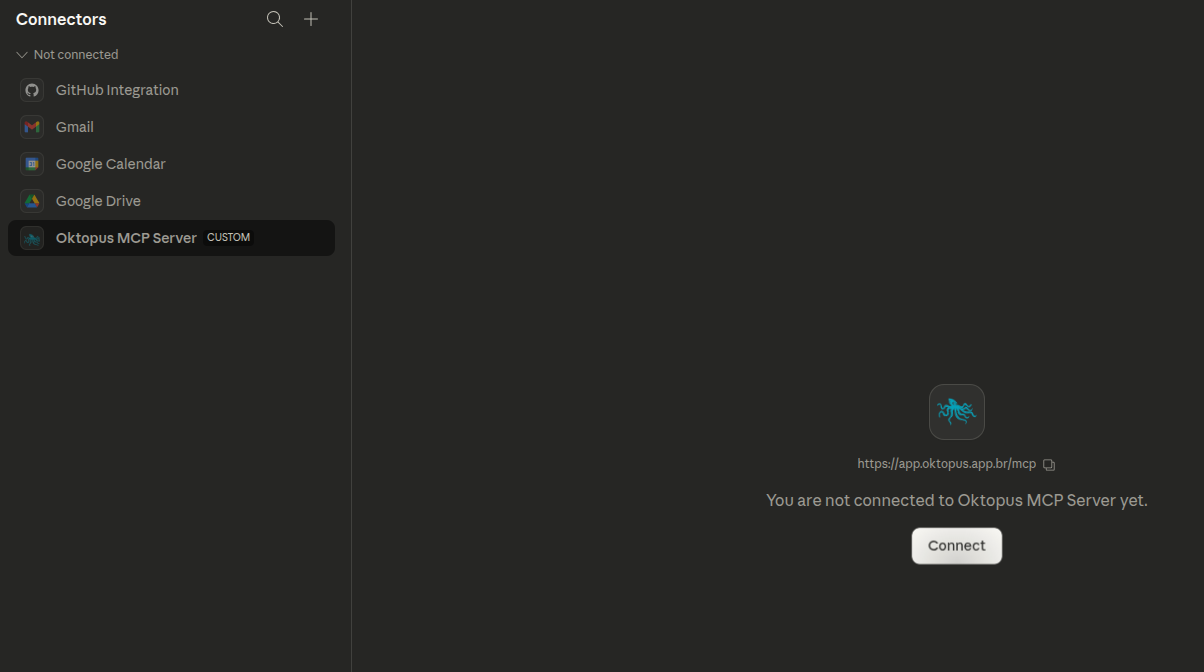
{% stepper %}
{% step %}
#### Go to Customize Tab
{% endstep %}
{% step %}
#### Add Oktopus MCP Server URL
The server domain can vary based on your account and deployment type. As a rule, utilize "https\://\/mcp".
Authenticate to the MCP server with user and password
Authorize LLM access to your Oktopus account
{% endstep %}
{% endstepper %}
### ChatGPT
As of this writing, custom MCP servers are not available in the free plan.
### Local LLMs
Several open-source and self-hosted LLM options are available for organizations prioritizing data privacy and local control. Check [Local vs 3rd Party LLM](#local-vs-3rd-party-llm) for a comparison.
To integrate a local LLM with Oktopus MCP, you run the LLM on your infrastructure (either on-premises or in a private cloud environment) and connect it to the MCP server using either the stdio protocol for direct process-based communication or the HTTP protocol if you're running the LLM as a separate service. With stdio, the MCP server and LLM run as connected processes on the same machine, providing low-latency communication. With HTTP, you expose the LLM as a REST API endpoint (typically on localhost or an internal network) that the MCP server can call remotely.
## Deployment Options
The Oktopus MCP server can be deployed using two different communication protocols.
We recommend using the MCP communication with HTTP transport for convenience. The tutorial and documentation materials focus on this *modus operandi.*
### Stdio
The MCP server communicates via standard input/output streams. This is a direct, process-based connection ideal for local or tightly integrated environments. You can download the Oktopus MCP server binary at: .
### **HTTP**
The MCP server exposes a REST API endpoint that can be accessed over HTTP. This enables network-based communication and allows remote clients to connect to the server from anywhere.
### Local vs 3rd Party LLM
Running a local LLM keeps all processing and data within your infrastructure, providing maximum privacy and control, no data leaves your network, and you're not dependent on external service availability or pricing. However, local LLMs typically require significant computational resources to run efficiently + engineering overhead for deployment and maintenance, while very probably having lower accuracy or capabilities compared to state-of-the-art models.
Third-party LLMs (like OpenAI's GPT-4, Claude, or Google's Gemini) are hosted in the cloud and require sending your queries and device data to external servers, which raises privacy and compliance considerations depending on your regulations. The tradeoff is that third-party LLMs generally offer superior performance, more advanced capabilities, and require minimal infrastructure investment on your end.
Choose local LLMs if data residency and privacy are critical; choose third-party LLMs if you prioritize cutting-edge performance and ease of deployment.